Capsuleers.app logo CAPSULEERS.APP

Guide · Market

Character Bazaar — complete guide

Every character for sale on the official EVE Online forum, with what the thread does not tell you: age, corporation, killboard, offers read from the replies and what the skill points would be worth as injectors. And, for sellers, a skillboard verified by ESI.

Last updated:

Account
Not needed to browse; EVE login to mark a character
Data
The official Character Bazaar forum, CCP ESI, market prices
Updates
The forum is read every 10 minutes
Role
Information only — sales happen on the forum
Character Bazaar: market numbers, filters and listing cards with skill points, offers and the price to extraction bar
The bazaar: market numbers on top, filters on the left, one card per listing.

What is the Character Bazaar?

Character Bazaar on Capsuleers.App is a tool that adds checks, prices and verified skillboards to the character listings of the official EVE Online forum. In EVE Online characters are sold in the Character Bazaar section of the official forum: the seller opens a thread with the character, buyers reply with offers, and CCP support transfers the character. A thread says what the seller chooses to say. Character Bazaar reads every listing and adds what can be checked: the character's age and corporation from ESI, kills and losses from our killboard, the offers left in the replies, and the extraction value — what the skill points would fetch if turned into Large Skill Injectors.

Sellers can go one step further: mark one of their own characters as for sale from the profile and get a public skillboard, read from ESI and refreshed every hour, with skills, queue, implants and the history of skill points. It proves the character is what the thread says, and that no skill points were extracted after it was listed.

Capsuleers.App does not sell or guarantee characters and does not act as a middleman: offers stay on the forum thread and every transfer goes through CCP support.

Buyers

Compare price against extraction value, see the offers already made and check age, corporation and killboard before you bid.

Sellers

Share a skillboard verified by ESI instead of screenshots, and keep track of offers on your thread.

Traders

Watch the median price per million skill points and how many new listings and offers arrive each day.

Getting started

  1. Open the bazaarListings are sorted by recent activity; no account needed.
  2. Narrow it downPick a focus (Capital, PvP, Mining…), a skill point range and a sale format.
  3. Open a listingOffers, checks and the seller's post on one page, with the thread one click away.
  4. Selling?In Profile › Characters for sale, mark your character and share the skillboard.

Features

Each card: what it does, how to use it, what it needs.
01

What is the state of the Character Bazaar market?

The top of Character Bazaar on Capsuleers.App summarises the whole market in four numbers, with no login. Four numbers on top: how many listings are open and how many arrived in the last 24 hours, the median price per million skill points, the extraction value per million (injector minus extractor price) and the offers made in the last 24 hours.

How to use it

  1. Open Character Bazaar.
  2. Compare the median price per million SP with the extraction value: the gap is what buyers pay over injectors.
No account needed

Four tiles: listings for sale, median price per million SP, extraction value and offers in 24 hours
Listings, prices and offers of the whole bazaar.
02

How do I filter characters by focus, skill points and format?

Character Bazaar filters narrow the forum listings by focus, skill point range, sale format and maximum price. The filters on the left narrow the listings by what the character is built for (Titan, Supercapital, Capital, PvP, PvE, Industry, Mining, Exploration, Trading), by skill point range, by sale format and by maximum price. Each focus chip shows how many listings it matches.

How to use it

  1. Type a name, ship or skill in Search.
  2. Click a focus under «Character focus»; click All to remove it.
  3. Pick a range under «Skill points» and a «Sale format».
  4. Enter a «Maximum price» such as 60b, and tick «Only with a skillboard verified on Capsuleers.App» if you want proof.
No account needed
Selecting the Capital focus and the 20–80 M skill points range: the listings narrow
AnimatedCapital pilots between 20 and 80 million skill points.
03

How do I find the best-value character?

Character Bazaar sorts listings by recent activity, most skill points, best value or lowest price; best value ranks the lowest price against the extraction value.

How to use it

  1. Use the Sort chips above the listings.
  2. «Best value» puts first the characters whose price is closest to — or below — what their skill points would be worth as injectors.
No account needed
Switching the sort to Best value and then to Most skill points
AnimatedThe same listings by value and by skill points.
04

How do I read a listing card?

A Character Bazaar listing card tells you at a glance whether the asking price is above or below what the skill points are worth as injectors. Each card shows the character with age, security status and corporation, the declared skill points and unallocated points, the focus chips, starting bid, buyout and top offer, and a bar comparing the price with the extraction value: the tick marks 1×, where price equals injectors.

How to use it

  1. Read the «Price / extraction value» bar: to the right of the tick you pay more than the skill points are worth extracted.
  2. Click the card to open the listing.
No account needed

Tip A card with «Character not identified» means the thread author is not a character ESI could find: be careful.

A listing card with portrait, skill points, bids and the price to extraction bar
Everything a thread title leaves out, on one card.
05

What does a listing page show?

Each Character Bazaar listing has its own page on Capsuleers.App, which gathers the checks and numbers the forum thread does not show. The listing opens with the character, the checks as chips (thread opened by the character, corporation, birth date, security) and five numbers: skill points, top offer, buyout, extraction value and the price to extraction ratio. The button on the right opens the forum thread to make an offer.

How to use it

  1. Click a card in the bazaar.
  2. Read the five tiles under the character.
  3. Use «Make an offer on the forum thread»: offers are made only there.
No account needed
The top of a listing: portrait, check chips and five tiles with skill points, offers and extraction value
A listing: the character, the checks and the five numbers.
06

How do I see the offers made on a character?

Character Bazaar rebuilds the offer history of a character from the replies in its forum thread: a chart shows how the top offer moved, and a table lists every bidder with their latest offer and the time in EVE time. Offers are made on the forum, never on Capsuleers.App.

How to use it

  1. Scroll to «Offer history» on the listing.
  2. Follow the line to see how fast the price is climbing.
  3. Open the thread to read the full conversation: replies without a clear amount are left out.
No account needed
The offer history chart and the table of bidders with their offers
Every bidder's latest offer, read from the thread.
07

What does Capsuleers.App check on a character?

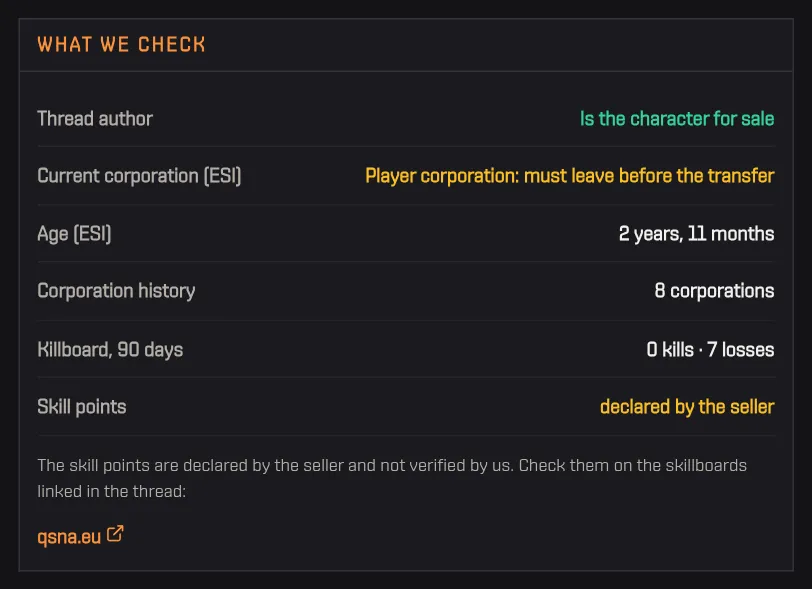
Character Bazaar runs a set of checks on public data for every listing, so you know what to ask the seller before bidding. A list of checks made on public data: whether the thread was opened by the character itself (a rule of the bazaar), the current corporation (the character must be in an NPC corporation to be transferred), age, corporation history, kills and losses in the last 90 days, and whether the skill points are declared or verified.

How to use it

  1. Read «What we check» next to the offers.
  2. A warning colour means something to ask the seller about before bidding.
No account needed
The What we check panel with thread author, corporation, age, history, killboard and skill points
The checks on public data, with warnings in yellow.
08

What does the seller declare?

Next to the checks, the listing page shows what the seller wrote, kept apart from what Capsuleers.App verified. The seller's first post, cleaned up, with the focus chips and unallocated skill points found in it, and below it the thread: author, opening date, last activity, replies and views, with a button to open it.

How to use it

  1. Scroll to «What the seller declares».
  2. Use «Read more» if the post is long, then «Open the thread».
No account needed
The seller's post with focus chips, and the thread panel with replies and views
The seller's own words, next to the thread's numbers.
09

How do I tell that a character is for sale?

A character listed in Character Bazaar is flagged on its public Capsuleers.App page. When a character is listed, its public page on Capsuleers.App shows a strip with the sale: declared or verified skill points, highest offer, buyout, a link to the listing and one to the thread. Whoever looks up a pilot learns it is for sale.

How to use it

  1. Open the page of a character that is listed.
  2. Use «See the listing» for the full page, or «Open the thread» for the forum.
No account needed
The Character Bazaar strip on a character page: thread, declared skill points, highest offer and buyout
The sale strip on a listed character's page.
10

How do I mark my character as for sale?

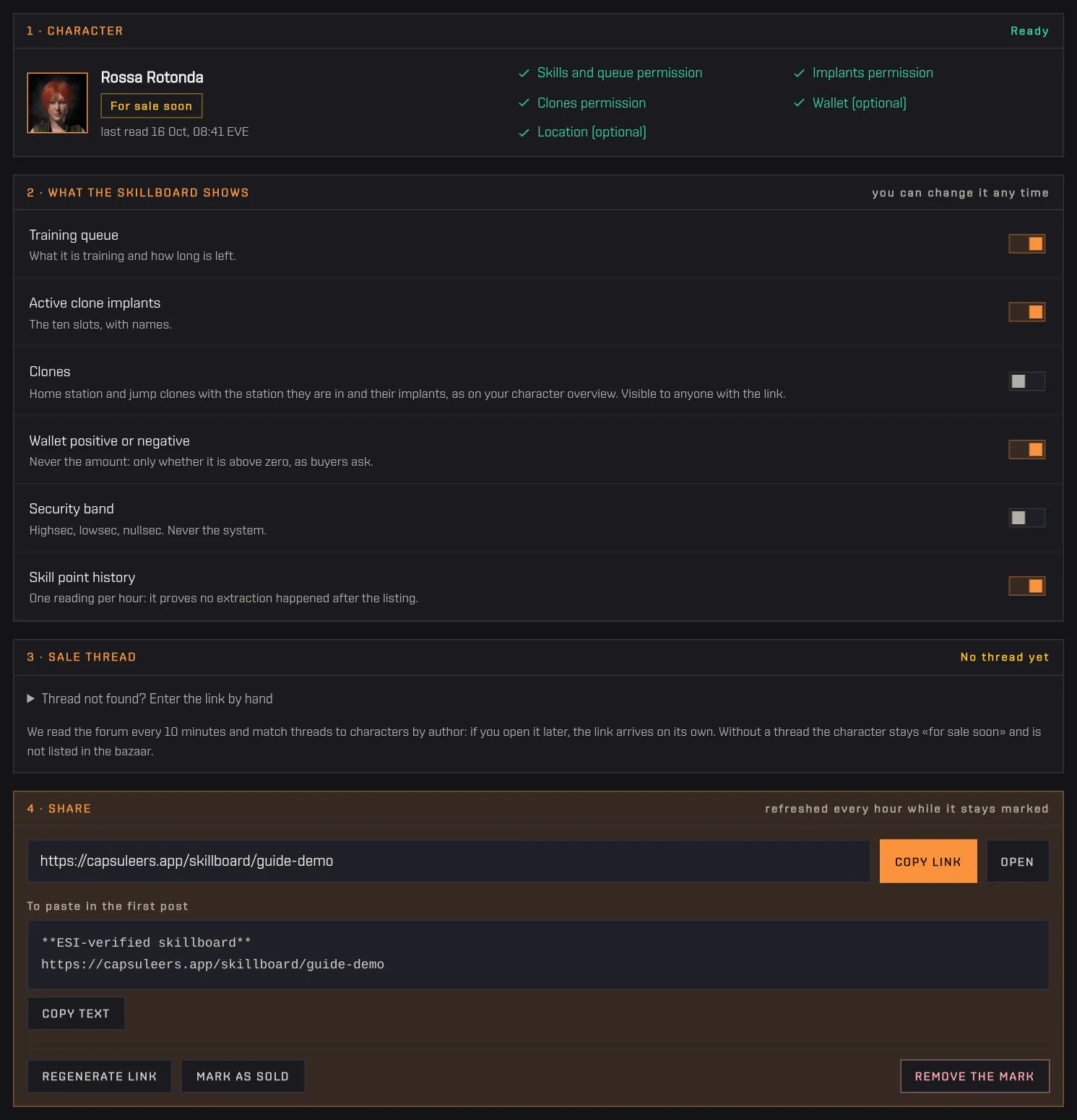
Sellers can mark one of their own EVE characters as for sale on Capsuleers.App to publish a skillboard verified by ESI. From the profile, a seller marks one of their characters as for sale. The page shows in four steps the character and its permissions, what the skillboard shows (training queue, implants, clones, whether the wallet is positive, security band, skill point history — each can be turned off), the sale thread (found on the forum by itself, or set by hand) and the link to share.

How to use it

  1. Sign in with EVE and enable Skills and Clones on the character.
  2. Open Profile › Characters for sale and click «Mark as for sale».
  3. Choose what the skillboard shows.
  4. Copy the link or the ready-made text and paste it in your thread.
  5. When the sale is done, click «Mark as sold».
EVE login + Skills and Clones services

Tip When the character is sold its skill copy is deleted: the skillboard only says «sold».

The four steps of a marked character: character, what the skillboard shows, sale thread, share
A marked character: options, thread and the link to share.
11

What is a verified skillboard?

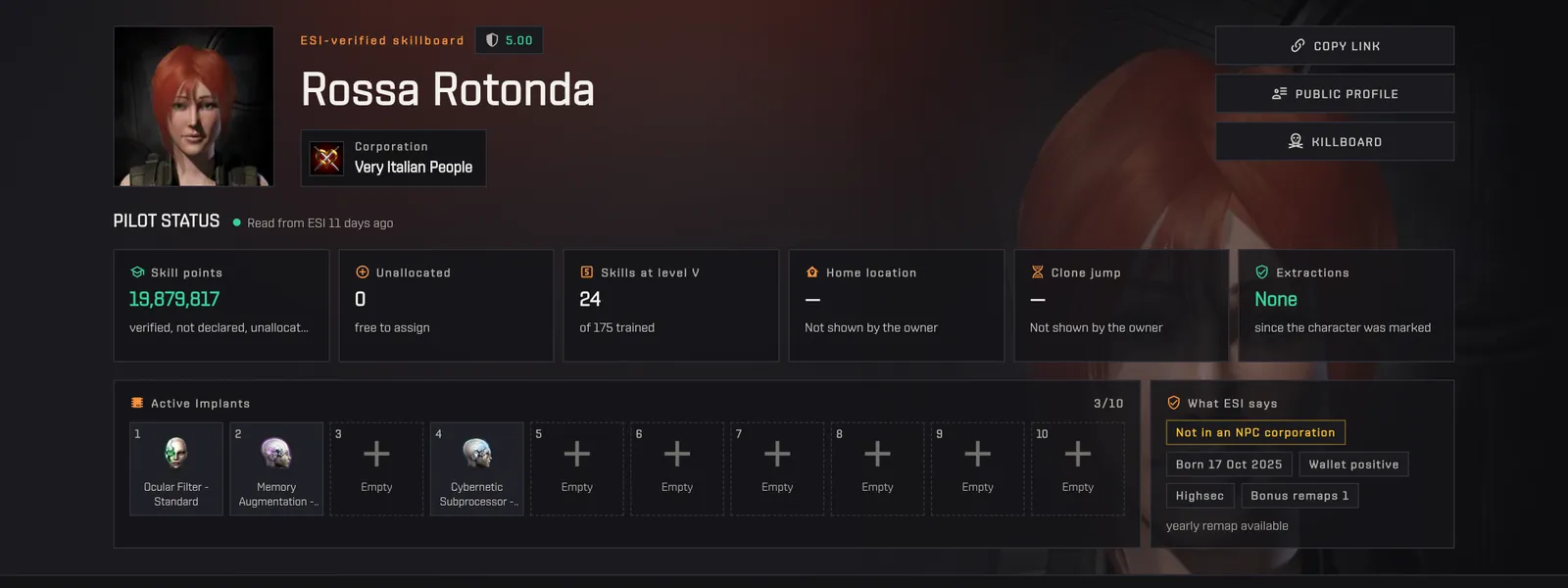
A verified skillboard is a public page that shows a character's skill points as read from ESI, not as declared by the seller. The public skillboard of a marked character: skill points read from ESI (not declared), unallocated points, skills at level V, active implants, and what ESI says — NPC or player corporation, birth date, wallet, security band, bonus remaps — plus a tile saying whether skill points were extracted after the character was marked.

How to use it

  1. Open the link shared by the seller, or «Open the verified skillboard» on a listing.
  2. Check «Extractions» and the corporation chip before making an offer.
No account needed
A skillboard: portrait, verified skill points, skills at V, implants and the ESI checks
Skill points and checks read from ESI, not from the thread.
12

How do I see every skill and the training queue?

The verified skillboard of a Character Bazaar listing shows the full skill matrix, group by group, with the same view as the character overview, and the training queue if the seller shows it.

How to use it

  1. Scroll to the skill matrix.
  2. Filter skills by name or sort by level and skill points.
  3. Open a group to see each skill and its level.
No account needed
The skill matrix by group with the training queue on the right
All skills by group, and the queue.
13

Which ships can it fly, and were skill points extracted?

The lower part of a verified skillboard shows which ship classes the character can fly, hull by hull, and a chart of skill points over time: a line that drops after the listing date means skill points were extracted.

How to use it

  1. Scroll below the matrix.
  2. Green hulls can be flown now; grey ones still need skills.
No account needed
Ship classes with flyable hulls, and the chart of skill points over time
Hulls it can fly, and skill points growing over time.

Frequently asked questions

How do I buy a character in EVE Online?

Find a listing in the Character Bazaar section of the official forum, make your offer as a reply in the thread, agree with the seller, then the seller starts the transfer with CCP support. The character must be in an NPC corporation. Capsuleers.App only helps you choose: it does not take part in the sale.

How much is an EVE Online character worth?

A floor is its extraction value: the skill points above 5 million turned into Large Skill Injectors, minus the extractors. The bazaar shows it on every listing, with the ratio between price and extraction value and the median price per million skill points.

How do I check a character before buying it?

The listing shows whether the thread was opened by the character itself, its corporation, age, corporation history and killboard. Ask the seller for a skillboard: one from Capsuleers.App is read from ESI and shows if skill points were extracted.

How do I sell my character with a verified skillboard?

Sign in with EVE, enable Skills and Clones on the character, then in Profile › Characters for sale click Mark as for sale. Copy the link or the ready-made text into your forum thread.

Are the skill points on a listing accurate?

Without a skillboard they are what the seller declared, and the page says «declared». With a skillboard verified on Capsuleers.App they are read from ESI and refreshed every hour.

Where do the offers come from?

From the thread replies: a reply by someone other than the seller that proposes an amount counts as an offer, and only each bidder's latest one is kept. A retracted offer is removed.

Does Capsuleers.App sell characters or hold ISK?

No. It neither sells, buys nor holds anything: offers are made on the forum and every transfer goes through CCP support.