Capsuleers.app logo CAPSULEERS.APP

Guide · Nullsec

Mercenary Dens — complete guide

Where Mercenary Dens die in nullsec, who hunts them, which temperate planets are quiet enough to anchor one, and how your own dens are doing — reinforcement timers, anarchy, keys and MTOs in one page.

Last updated:

Account
Optional — only for My dens and alerts
Data
Our killmail archive, CCP ESI and the static data
Window
24 hours to 90 days of den kills
Writes
None — the site only reads
Mercenary Dens Activity tab: den kills, ISK destroyed, keys dropped, the feed of destroyed dens and who kills them
The last seven days of Mercenary Den kills in nullsec, with who shot them.

What are Mercenary Dens?

Mercenary Dens is the Capsuleers.App tool that shows where Mercenary Dens are destroyed in EVE Online nullsec and where it is quiet enough to anchor one. Dens are not public: no API says who owns one or where it sits. They become visible when they die, because every destroyed den leaves a killmail that names the planet. The tool reads those killmails from our archive and turns them into a picture of nullsec: how many dens fall, where, who kills them and how many Infomorph keys stay in the wreck.

The same kills measure risk. «Where to anchor» lists every temperate planet in nullsec that can host a den — the ones with workforce — and ranks them by how many dens died in the system and one jump away in the last 30 days. Activity and Where to anchor need no account.

Sign in with EVE and «My dens» shows every den of every pilot on your account: state, development, anarchy, keys inside, reinforcement timers and open MTOs, with a to-do list ordered by urgency. Den alerts can warn you on your phone. The site only reads: it never writes to your account or to the game.

Den owners

All your dens in one place, with what needs doing first and alerts when one is attacked.

Planners

Pick a planet where dens survive, with workforce and the jumps to Zarzakh to sell keys.

Hunters

See which regions and alliances lose dens, and when they fall in EVE time.

Getting started

  1. Open ActivityPick a window from 24 hours to 90 days: tiles and feed follow it.
  2. Filter the feedBy who killed the den, or by region from the Regions panel.
  3. Choose a planetIn Where to anchor, keep the low-risk planets and sort by workforce.
  4. Watch your densSign in with EVE and enable the Mercenary Den service to see My dens.

Features

Each card: what it does, how to use it, what it needs.
01

How many Mercenary Dens are destroyed in nullsec?

Mercenary Dens answers this with five tiles that sum up the window you choose, from 24 hours to 90 days: dens destroyed (with the change against the previous period and a daily sparkline), ISK destroyed, Infomorph keys dropped and destroyed, the median value of a den, and how many systems and owners were hit. Tiles, feed and side panels all switch together when you click 24 h, 7 d, 30 d or 90 d. The start date of our killmail archive is written on the right, and a 90-day window cannot reach before it.

How to use it

  1. Open the Activity tab.
  2. Click a window: 24 h, 7 d, 30 d or 90 d.
  3. Tiles, feed and side panels all switch to that window.
No account needed

Tip The archive start date is written on the right: a 90-day window cannot reach before it.

Switching the window from 7 days to 30 days and 24 hours: the five tiles change
AnimatedThe same five numbers over three different windows.
02

Which dens were destroyed, and who killed them?

The «Latest dens destroyed» feed of Mercenary Dens lists every destroyed den: the planet, the owner with corporation and alliance, who killed it and with how many pilots, the value of the kill and how many Infomorph keys were left in the wreck. A chip classifies each kill as Raid (a third party), Landlord (the alliance holding the system) or Own alliance. Click a chip to keep only that kind of kill, and page through older kills with Previous and Next. The landlord is the alliance holding the system today, not at the time of the kill, and the page says so.

How to use it

  1. Scroll the «Latest dens destroyed» list.
  2. Click Raid, Landlord or Own alliance to keep only that kind of kill; All brings them back.
  3. Use Previous and Next at the bottom to page through older kills.
No account needed

Tip The landlord is the alliance holding the system today, not at the time of the kill: the page says so.

The feed of destroyed dens filtered to Raid and then Landlord
AnimatedFiltering the feed by who killed the den.
03

How do I read the killmail of a destroyed den?

To read the killmail of a destroyed den, click its row in the Mercenary Dens feed: the full killmail opens in a side panel with the victim, the attackers, fitted and dropped items and the value. The feed stays where it was, so you can go through kills one after another without losing your place. Close the panel with the X or Esc; Ctrl-click opens the full killmail page in a new tab instead.

How to use it

  1. Click a row of the feed.
  2. Read the killmail in the panel on the right.
  3. Close it with the X or Esc; Ctrl-click opens the full page in a new tab instead.
No account needed
Clicking a destroyed den in the feed opens its killmail in a side panel
AnimatedThe killmail of a destroyed den, opened over the feed.
04

Which regions lose the most Mercenary Dens?

Mercenary Dens ranks the regions by dens lost in the «Regions» panel next to the feed, while «Who kills them» splits the kills into Raid, Landlord and Own alliance. Click a region and the whole page narrows to it: tiles and feed show only its dens. Click it again, or the X on its chip, to remove the filter. It is the quickest way to see where dens are being hunted in the window you chose.

How to use it

  1. Read the shares in «Who kills them».
  2. Click a region in the Regions panel: tiles and feed narrow to it.
  3. Click it again, or the X on its chip, to remove the filter.
No account needed
Clicking the top region in the Regions panel filters the feed to that region
AnimatedOne click on a region and the page shows only its dens.
05

Which alliances hunt dens, and which lose them?

The Alliances panel of Mercenary Dens answers who hunts dens and who loses them: «Hunting» ranks the alliances that destroy the most dens in the window, «Losing» those that lose the most. Switch between the two, and click any name to open that alliance's page on Capsuleers.App. The ranking follows the window and the region filter you picked.

How to use it

  1. Find the Alliances panel on the right.
  2. Switch between Hunting and Losing.
  3. Click an alliance to open its page.
No account needed
The Alliances panel switching between Hunting and Losing
AnimatedHunters and losers of the chosen window.
06

At what time of day do dens get destroyed?

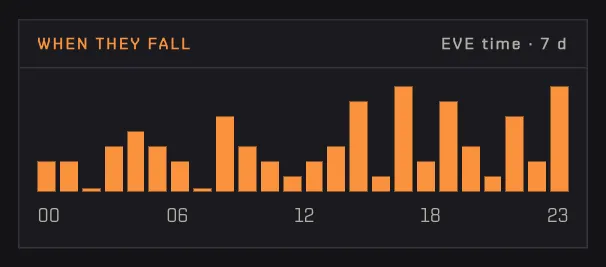
The «When they fall» chart of Mercenary Dens counts the dens destroyed in the window for each hour of the day, in EVE time, with one bar per hour. The peak hour is highlighted: it tells you when your timezone is most exposed. Compare it with the hours you are usually online to decide when to check your own dens.

How to use it

  1. Scroll to «When they fall» below the Alliances panel.
  2. Compare the peak with the hours you are usually online.
No account needed
Bars of den kills for each hour of the day in EVE time
Den kills by hour, EVE time.
07

Which planets keep losing their dens?

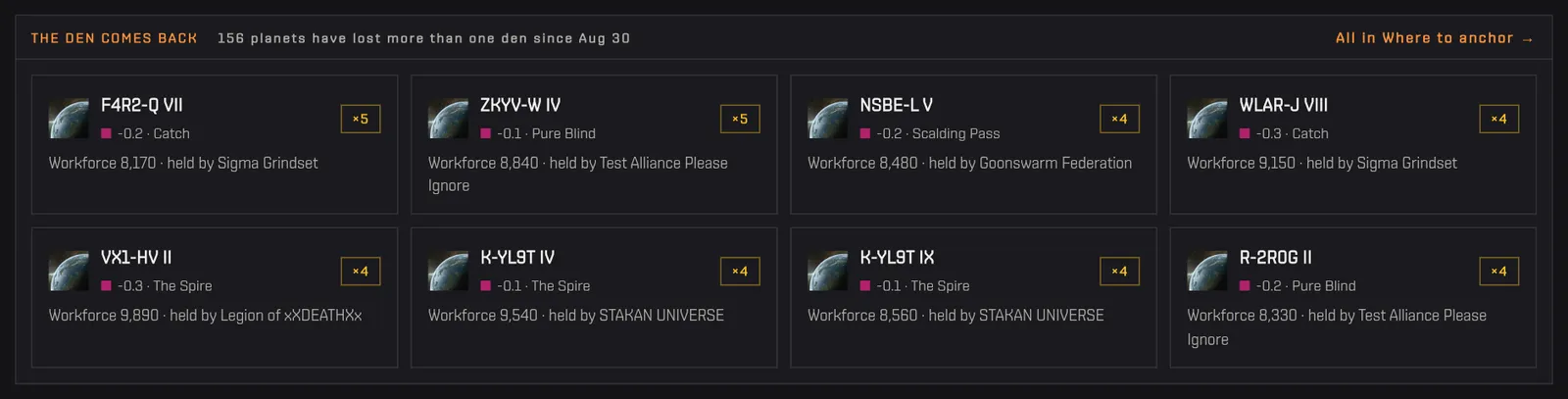
«The den comes back» in Mercenary Dens lists the planets where more than one den has been destroyed since our archive began: someone keeps anchoring there, and someone keeps shooting it. It sits at the bottom of the Activity tab. Click a planet to open it in Where to anchor, or use the link to see them all.

How to use it

  1. Scroll to the bottom of the Activity tab.
  2. Click a planet to open it in Where to anchor, or use the link to see them all.
No account needed
Cards of planets where more than one den has been destroyed
Planets where dens keep being anchored and destroyed.
08

Where can I anchor a Mercenary Den?

A Mercenary Den can be anchored on a temperate planet in nullsec with workforce, and the Where to anchor tab of Mercenary Dens lists every one of them. Each row shows the planet with its security and region, the alliance holding the system, the workforce, the dens lost there, the risk and the jumps from Zarzakh, where Infomorph keys are sold. The summary on top counts the possible planets, how many have no dens lost nearby and the workforce range. The risk counts dens destroyed in the system and one jump away in the last 30 days; those in the system weigh three times. The map button opens the planet on the live map.

How to use it

  1. Open the «Where to anchor» tab.
  2. Read the summary on top: possible planets, how many have no dens lost nearby, the workforce range.
  3. Use the map button at the end of a row to open the planet on the live map.
No account needed

Tip The risk counts dens destroyed in the system and one jump away in the last 30 days; those in the system weigh three times.

The Where to anchor tab with the summary and the table of temperate planets
Temperate planets in nullsec, ranked by risk and workforce.
09

How do I find the quietest planet to anchor on?

To find the quietest planet, filter Where to anchor by Low risk, meaning no dens lost in the system or one jump away in the last 30 days, then sort by workforce. The filters also narrow the list by planet, system or alliance name, region and minimum workforce — useful if you need a strong skyhook — or to planets where a den has already died. Counts on the chips update with the other filters, and the list sorts by Recommended, Workforce, Risk or distance from Zarzakh.

How to use it

  1. Type a name in Search and press Enter, or pick a region.
  2. Click Low, Medium or High under Risk.
  3. Choose a minimum workforce if you need a strong skyhook.
  4. Sort with Recommended, Workforce, Risk or Zarzakh.
No account needed
Selecting the Medium risk filter and sorting the planets by workforce
AnimatedNarrowing the planets by risk, then sorting by workforce.
10

How do I see all my dens and what to do first?

Sign in with EVE, enable the Mercenary Den service on your pilots and open «My dens»: it shows all the dens of all your pilots with four totals (dens over slots, keys inside with their value, open MTOs, keys at risk in reinforced dens) and a «To do now» list ordered by urgency — a den coming out of reinforcement, anarchy draining the skyhook, MTOs about to expire, a stopped den. ESI updates dens about once an hour, so use Refresh after acting in game.

How to use it

  1. Sign in with EVE and enable the Mercenary Den service on your pilots.
  2. Open the «My dens» tab.
  3. Start from the top of «To do now» and work down.
  4. Use Refresh after acting in game (ESI updates dens about once an hour).
EVE login + Mercenary Den service
My dens: four totals and the To do now list with reinforcement, anarchy, MTOs and a stopped den
Your dens, summed up, with the most urgent action first.
11

How do I check a den's timers and MTOs?

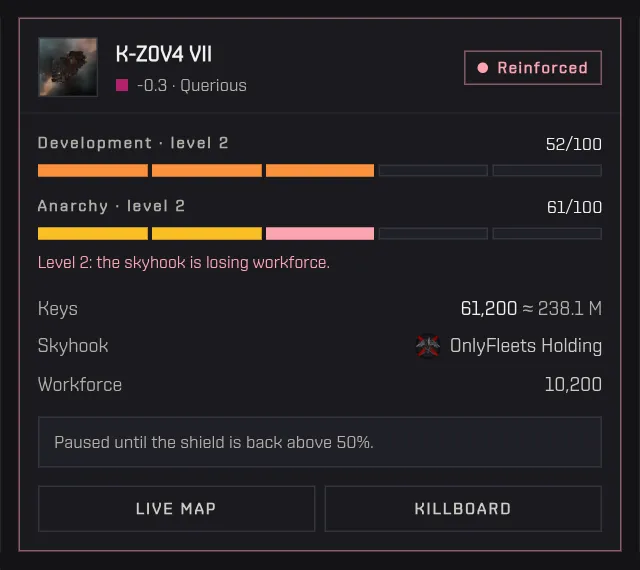
Each den in My dens has a card with its state (running, reinforced or stopped), development and anarchy levels, keys inside with their ISK value, the skyhook it is anchored to and the workforce. A reinforced den shows when it comes out, and open MTOs are listed with their effects. From anarchy level 2 the den drains workforce from the skyhook, which is the most common reason a landlord shoots it. Live map and Killboard links let you look at the system around it.

How to use it

  1. Scroll to a pilot: its dens follow, with how many slots the skill allows.
  2. Read the reinforcement timer and the anarchy warning on each card.
  3. Use Live map or Killboard to look at the system around it.
EVE login + Mercenary Den service

Tip From anarchy level 2 the den drains workforce from the skyhook — the most common reason a landlord shoots it.

A reinforced den card with its timer, development, anarchy, keys and skyhook
A reinforced den: when it comes out and what is inside.
12

Why are some of my pilots missing from My dens?

Pilots missing from My dens are the ones that have not granted the Mercenary Den service. They are listed at the bottom with an «Enable for» button that opens the profile on the right setting. Turn on the Mercenary Den service there and confirm with EVE login, and their dens join the page.

How to use it

  1. Click «Enable for» next to the pilot.
  2. In the profile, turn on the Mercenary Den service and confirm with EVE login.
EVE login + Mercenary Den service
The list of pilots without the Mercenary Den service, each with an Enable button
Every pilot is one click away from being included.
13

How do I get alerts when my den is attacked?

Mercenary Dens can send push notifications for your own dens when one is attacked, reinforced, gets a new MTO or has an MTO about to expire. They arrive within about ten minutes, the time ESI takes to refresh character notifications. Enable the Den alerts service on your pilots from the profile, allow notifications on the device in Profile › Notifications, then turn on «My Mercenary Dens» and pick the events.

How to use it

  1. Enable the Den alerts service on your pilots from the profile.
  2. In Profile › Notifications, allow notifications on this device.
  3. Turn on «My Mercenary Dens» and pick the events: Attacked, Reinforced, New MTO, MTO expiring.
Den alerts service + notifications on

Tip On iPhone, notifications work only after adding Capsuleers.App to the Home Screen.

The My Mercenary Dens notification topic switched on in the profile, with the four den events selected
One switch for your dens, then the events. Until a pilot grants the Den alerts service, the panel says nothing can arrive.

Frequently asked questions

How do I find where Mercenary Dens are in EVE Online?

Mercenary Dens are not public, but each one appears on a killmail when it is destroyed. The Activity tab of Capsuleers.App's Mercenary Dens lists every den killed in nullsec in the window you choose, with planet, owner and attackers.

Which planets can host a Mercenary Den?

A Mercenary Den can be anchored on a temperate planet in nullsec with workforce, near a skyhook. The Where to anchor tab lists all of them with security, region, sovereignty and workforce.

What is the safest place to anchor a Mercenary Den?

No place is fully safe, but some are quiet: filter Where to anchor by Low risk, meaning no dens lost in the system or one jump away in the last 30 days, then sort by workforce.

Why do landlords shoot Mercenary Dens?

From anarchy level 2 a Mercenary Den drains workforce from the skyhook of the alliance that holds the system, so landlords shoot it. Completing MTOs keeps anarchy down; the den card and the to-do list warn you when it gets high.

How many Infomorph keys drop when a den dies?

Part of the Infomorph keys stays in the wreck when a den dies: the feed shows how many were dropped for every kill, and the tiles sum them for the window.

Which ESI permissions does Mercenary Dens need?

Activity and Where to anchor are public and need no permission. My dens needs the Mercenary Den service; alerts on attack, reinforcement and new MTOs need the Den alerts service, which reads EVE notifications.

How fast does a den alert arrive?

A den alert arrives within about ten minutes: ESI refreshes character notifications every ten minutes, so checking more often would not see anything new.