Capsuleers.app logo CAPSULEERS.APP

Guide · Navigation

Thera Finder — complete guide

Pick the system you are in and the Thera Finder lists every public wormhole into Thera and Turnur, nearest first: how many gates away, which signature to scan, how big a ship fits and how long the hole has left.

Last updated:

Account
Not needed — only for the waypoint
Data
EVE-Scout public signatures
Distance
Stargate jumps from your origin
Covers
Thera and Turnur
The Thera Finder from Amarr: connections ordered by jumps, with the two signatures, max ship size and hours left of each wormhole
From Amarr: every Thera and Turnur entrance, nearest first.

What is the Thera Finder?

The Thera Finder on Capsuleers (Capsuleers.App) shows the closest public wormhole into Thera or Turnur from any EVE Online system, ranked by stargate jumps. Pick your system and it lists every entrance with the signature to scan, the largest ship that fits and the hours the hole has left, using public EVE-Scout data and no account.

Thera and Turnur are the two systems of New Eden with permanent, public wormhole networks. The scouts of EVE-Scout scan their connections every day and publish them: the tool takes that list, keeps it for about two minutes, and measures for each entrance how many stargate jumps it is from the system you choose. If EVE-Scout is briefly unreachable, the last good copy is served instead of an error. Only entrances reachable by gate from your origin are listed.

The result answers one question quickly: where is the closest door into Thera or Turnur from here, and is it still worth flying to? Each row carries what you need in game — the signature to warp to, the one on the other side, the largest hull the hole accepts and how many hours it has left. It is the starting point for a wormhole shortcut; if you already know the destination, the Route Planner computes the whole trip through Thera or Turnur on its own.

Explorers and haulers

Cross half of New Eden through Thera instead of forty gates, with a hull that fits.

Roamers and hunters

Find the nearest entrance to jump into deep nullsec or a different empire region tonight.

Corporation logistics

Check which holes can take a battleship or a freighter before asking pilots to move.

Getting started

  1. Type your systemStart typing and pick the system from the suggestions.
  2. Press SearchThe list fills with every connection, nearest first.
  3. Read the rowJumps, entry signature, max size and hours left.
  4. Fly and scanSet the waypoint, reach the system and scan the signature.

Features

Each card: what it does, how to use it, what it needs.
02

How do I read a Thera or Turnur connection?

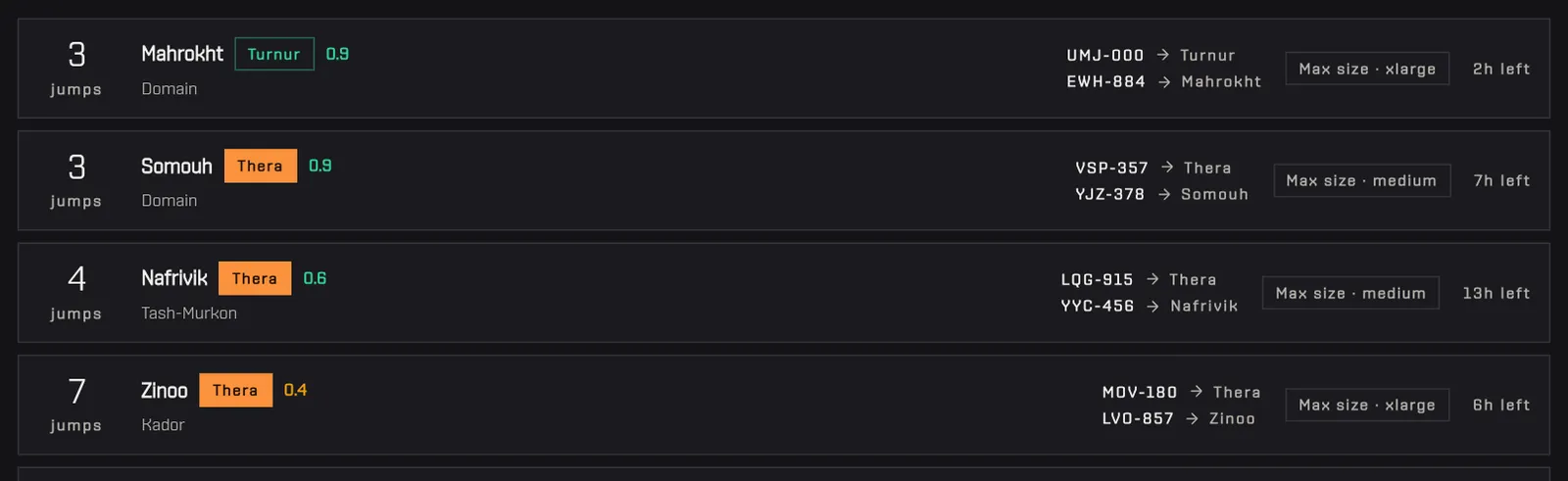
Each row of the Thera Finder is one wormhole and reads left to right: the stargate jumps from your origin, the entry system with its security status, its region and a Thera or Turnur chip, then the two signatures, the maximum ship size and the hours left. The entry signature is the one you scan down in the entry system; the other is the same hole seen from inside Thera or Turnur. Max size is the largest hull class the hole lets through, from small up to capital. Hours left turn amber below 8 and red below 2, a warning that the hole may collapse before you arrive. All values are the ones published by EVE-Scout; the tool does not scan anything itself.

How to use it

  1. The first signature (the line ending in → Thera or → Turnur) is the one to scan in the entry system: it leads into Thera or Turnur.
  2. The second (the line ending in the entry system's name) is the same hole seen from inside Thera or Turnur: use it to come back out.
  3. Max size tells you the largest hull class the hole lets through — from small up to capital.
  4. The hours left turn amber under 8 hours and red under 2: a red hole may close while you are on your way.
No account needed

Tip The security number next to the system matters: a highsec entrance a few jumps further is often safer than a lowsec one next door.

Close-up of the first connections: jumps, entry system, security, Thera or Turnur chip, the two signatures, max size and hours left
Jumps, entry system, both signatures, max size and remaining life.
03

How do I show only Thera or only Turnur?

To show only Thera or only Turnur, use the two toggle buttons in the header of the Thera Finder results on Capsuleers (Capsuleers.App): each switches one destination on or off, and the list updates at once without a new search. Run a search first, because the buttons act on the results already loaded. Turning Turnur off keeps only the Thera connections, and the other way round; clicking again brings them back. The jump counts do not change, since they stay measured from the same origin system. The two hubs differ: Thera is a wormhole system reachable only through wormholes, Turnur a lowsec system in Metropolis. No login is needed.

How to use it

  1. Run a search first.
  2. Click Turnur to hide its connections and keep only the Thera ones, or the other way around.
  3. Click it again to bring them back.
No account needed

Tip Turnur is in Metropolis lowsec, Thera is a wormhole system: if you are going to deep wormhole space, keep only Thera.

Clicking the Turnur button: the Turnur rows disappear and only the Thera connections remain
AnimatedTurnur off: only the Thera connections remain.
04

How do I send a Thera entrance to my autopilot?

To send a Thera or Turnur entrance to your autopilot, sign in with EVE on Capsuleers (Capsuleers.App), enable the waypoint permission (the ESI scope esi-ui.write_waypoint.v1) for your character and click Waypoint on a row. The tool sets the entry system as the destination in the game client of the character you pick and confirms on the page. The button appears only if at least one of your characters has granted that permission. The new waypoint replaces that character's current autopilot route, because the tool clears the other waypoints. It targets the entry system, not the signature: you still scan the wormhole down yourself on arrival. Only this button needs login; searching never does.

How to use it

  1. Sign in with EVE and enable the waypoint permission for the character in your profile.
  2. Click Waypoint on the connection you want.
  3. Pick the character from the list: the destination appears in your client and a confirmation shows on the page.
EVE loginWaypoint scope

Tip The waypoint replaces the current autopilot route of that character.

Clicking Waypoint on the first connection opens the list of characters with the waypoint permission
AnimatedWaypoint opens the list of your characters that can receive it.

Frequently asked questions

Where do the Thera and Turnur wormholes come from?

The wormholes come from EVE-Scout, the community that scans and publishes the Thera and Turnur connections every day. The Thera Finder on Capsuleers reads their public signature list and adds the stargate distance from your system.

How fresh is the list?

The list is at most a couple of minutes old: the site keeps the EVE-Scout list for about two minutes and then reads it again. If EVE-Scout cannot be reached, the last good copy is shown. A wormhole closed in game a moment ago can still show until the scouts remove it, so check the hours left before a long trip.

Do I need probes to use a Thera wormhole?

Yes, to warp to the wormhole you need to scan its signature down in your own probe window. The Thera Finder tells you which system and which signature ID to look for, which makes the scan quick, but it does not give you a warp-to. Fitting a probe launcher is the safe choice.

What does max size mean?

Max size is the largest hull class the wormhole lets through: small for frigates and destroyers, medium up to battlecruisers, large for battleships, xlarge for freighters and capital for capital ships. Check it before flying a big hull to the entrance.

Why is Zarzakh never on the path?

Zarzakh is never crossed because entering it by gate locks you to that same gate for six hours, so it cannot be used as a corridor. The Thera Finder measures its distances without crossing it.

What is the difference between Thera and Turnur?

Thera is a wormhole system with its own stations, reachable only through wormholes, while Turnur is a lowsec system in Metropolis that also hosts a stable set of wormhole connections. Both are listed, and you can hide either with the header buttons.

Can I compute a full route through Thera?

Yes, with the Route Planner on Capsuleers: turn on the Thera or Turnur shortcut and it uses these same connections inside the itinerary, with the signatures to scan.